Provider Bulk Sync
Architecture Diagram
High Level Diagram
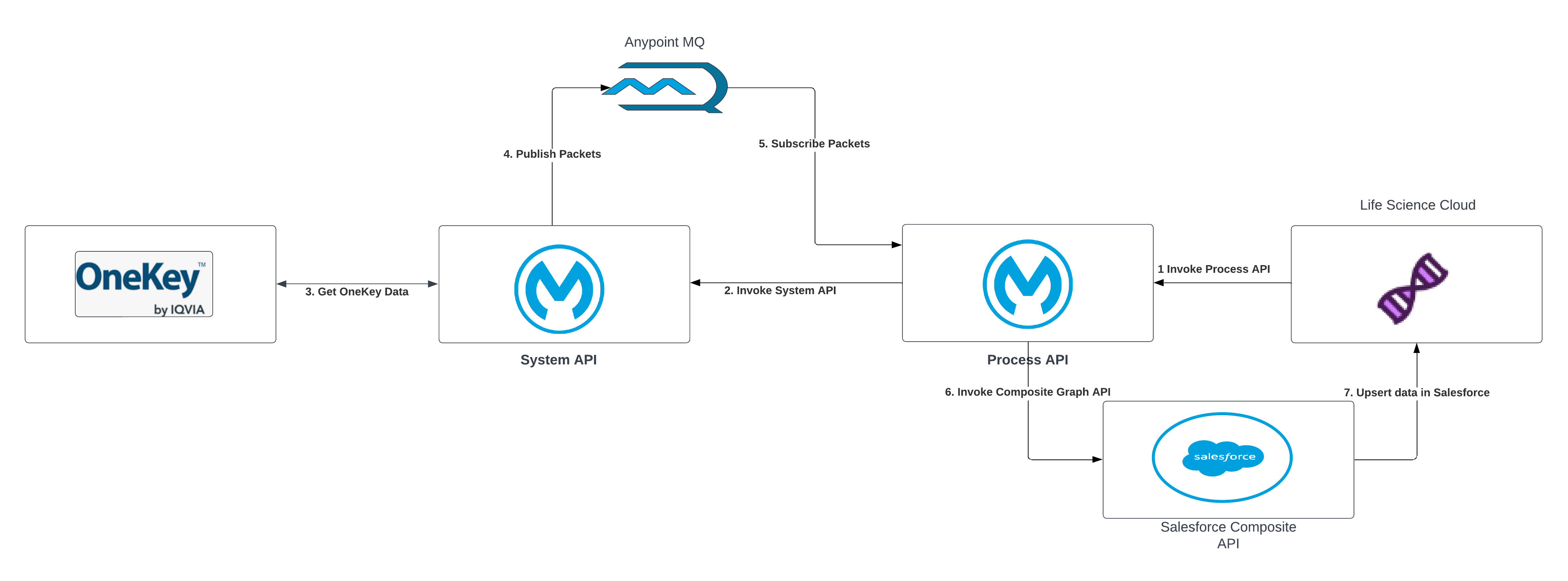
| S.No | Description |
|---|---|
| 1 | A request is initiated from LifeScience or Health Cloud and is sent to the Process API to initiate an MDM system data sync. |
| 2 | The request to fetch data from the MDM system is sent from the Process API to the System API. |
| 3 | The System API fetches the data from the MDM system. |
| 4 | The data is fetched in a paginated format and records in each page are mapped to Salesforce entities and fields. These messages are published to Anypoint MQs. |
| 5 | The Process API subscribes to the messages from Anypoint MQs. |
| 6,7 | The data is upserted into Salesforce using the Composite Graph API. |
Initiate Codes Sync:
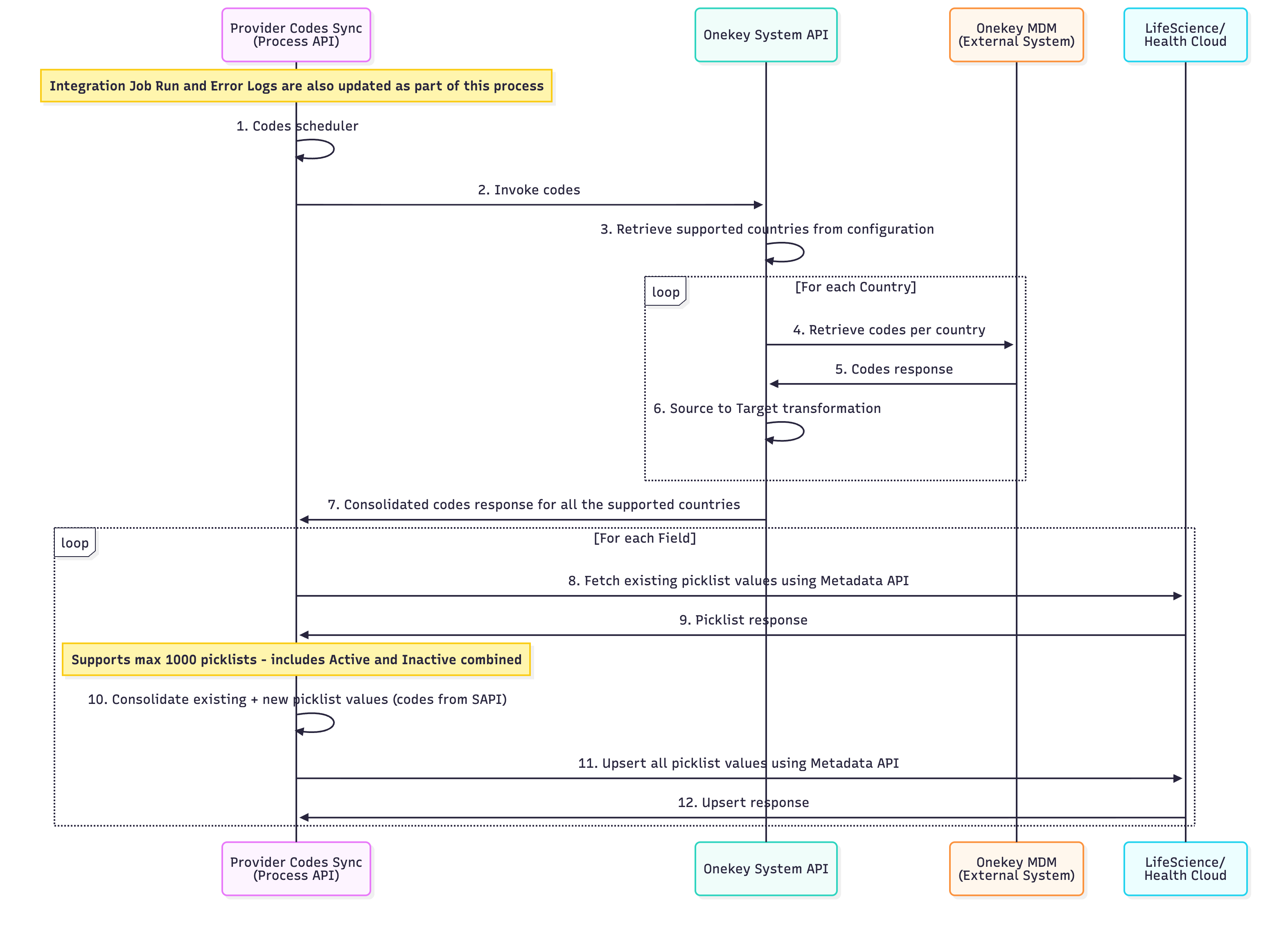
| S.No | Description |
|---|---|
| 1 | Process API initiates a scheduled job that must be completed before the Bulk Sync Process begins. |
| 2 | Process API invokes System API for Codes. |
| 3 | System API obtains the supported countries, in isoCod2 format, from the configuration. |
| 4 | System API calls the MDM system for each supported country to obtain codes. |
| 5 | MDM System provides a response with specific codes. |
| 6 | System API converts source codes to target codes using the specified codes and codeValues mapping. |
| 7 | Consolidate country-specific codes from the System API response. |
| 8 | Retrieve picklist values for each field from the System API response from Salesforce StandardValueSet using Metadata API. |
| 9 | Salesforce then provides all the corresponding picklist values for that field. |
| 10 | Combine existing Salesforce picklist values with new converted code values from the System API to create a list of codes, ensuring the total number of picklists does not exceed 1000. |
| 11 | Use the Metadata API to upsert all picklist values to Salesforce. |
| 12 | Upsert response from Salesforce. |
1. Initiate Data Sync:
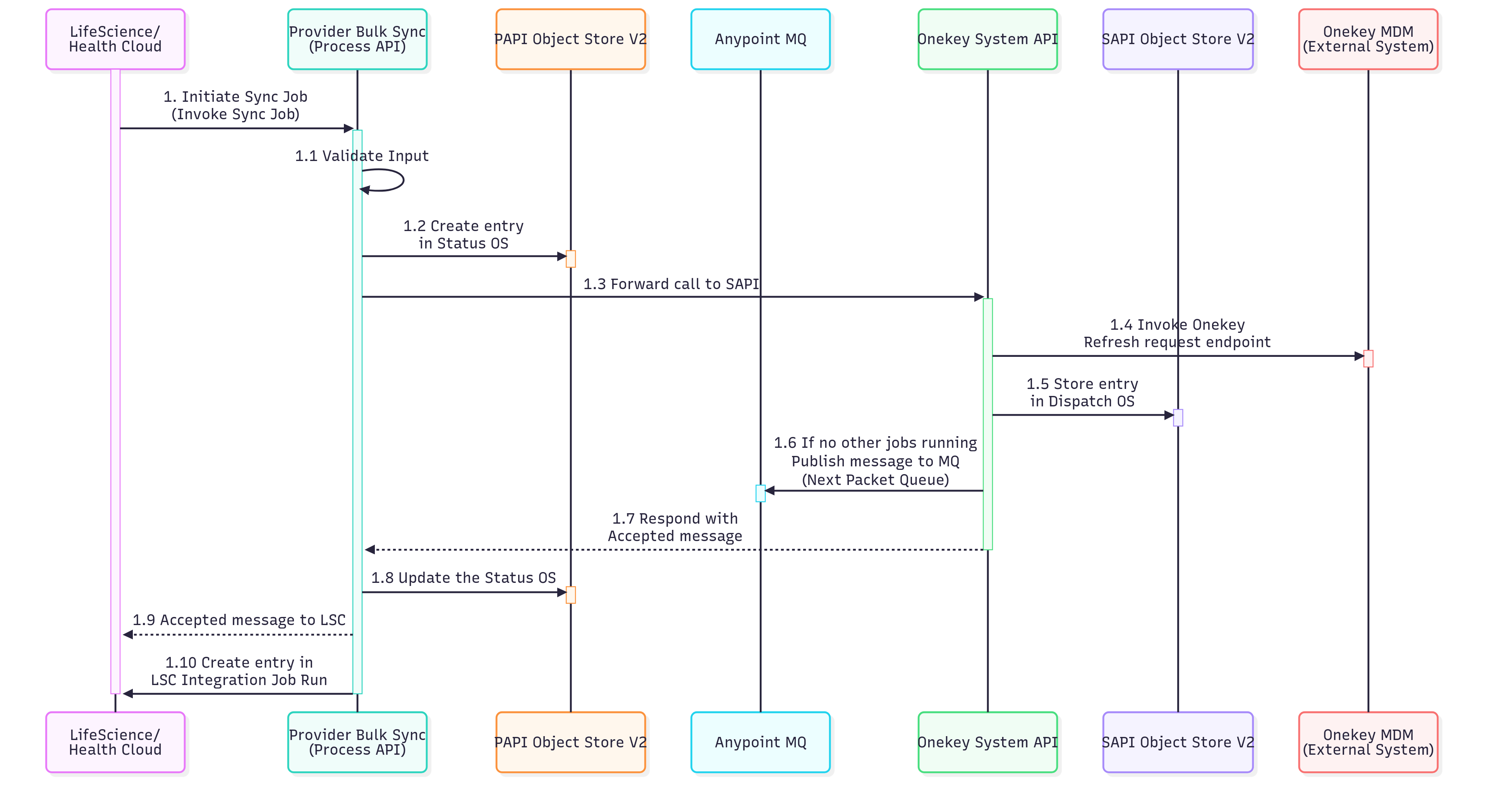
| S.No | Description |
|---|---|
| 1 | The Life Science or Health Cloud system triggers the bulk synchronization process for provider data. |
| 1.1 | The Provider Bulk Sync API validates inputs and rejects invalid requests before initiating the sync job. |
| 1.2 | The initial status for the job identifier is stored in the Status Object Store (OS) to monitor the synchronization job's lifecycle. |
| 1.3 | The request is then sent to the System API (SAPI) layer. The SAPI layer connects to the external MDM system to get provider data. |
| 1.4 | An API call is initiated to the MDM system's endpoint to verify and activate the provider's data synchronization process. |
| 1.5 | An entry for the job identifier is created in the Dispatch Object Store to manage the order of sync operations and track the processing queue. |
| 1.6 | The System API verifies if other sync jobs are active. If not, it publishes a message to the "Next Packet" queue, initiating the sync job's processing. |
| 1.7 | An acknowledgment response is sent back to the calling system indicating that the sync job has been successfully accepted and queued for processing. |
| 1.8 | The status object store is updated to reflect the current state of the job. |
| 1.9 | A confirmation message is sent to the Life Sciences or Health Cloud system to notify it that the sync job has been accepted. |
| 1.10 | Details of the synchronization operation are recorded in the IntegrationJobRun entity for tracking purposes. |
2. Process Data:
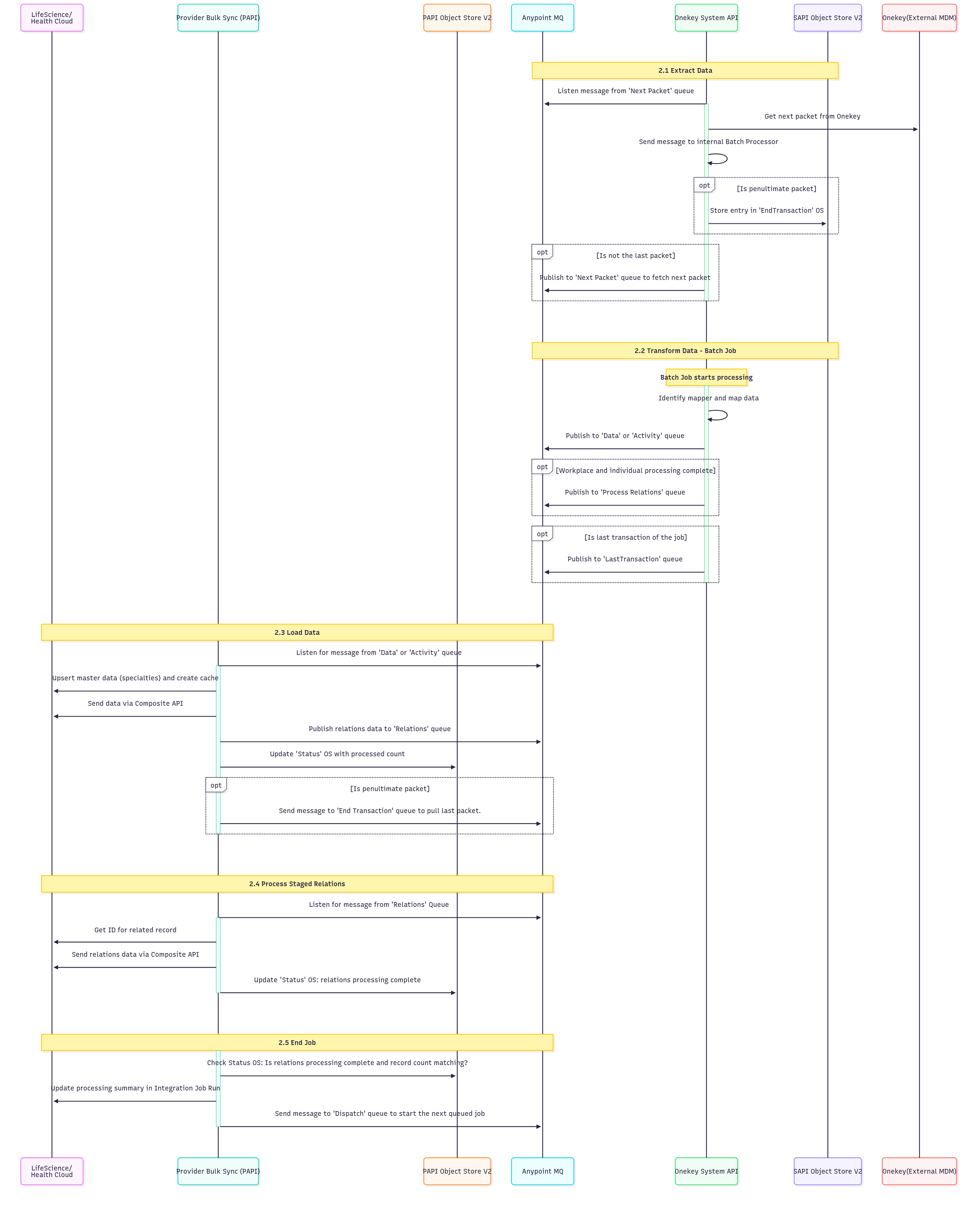
| S.No | Description |
|---|---|
| 2.1 | Data Extraction: This step manages data extraction from the OneKey system using a queue-based messaging system. It listens for messages from the "Next Packet" queue to retrieve the subsequent data packet from OneKey and then sends it to an internal Batch Processor. The process includes logic to identify if it's the penultimate packet (triggering an "EndTransaction" object store entry) or if more packets need to be fetched, it publishes to the "Next Packet" queue for continued processing. |
| 2.2 | Transform Data (Batch Job): This phase handles batch processing and data transformation. The batch job identifies and applies the correct data mapper, transforming data according to predefined mapping rules. The processed data is then published to either "Data" or "Activity" queues, depending on its type. Upon completion of workplace and individual processing, the data is published to the "Process Relations" queue. Finally, for the last message of the job, a signal of completion is published to the "LastTransaction" queue. |
| 2.3 | Load Data: This step manages data loading by listening to "Data" or "Activity" queues. It upserts master data (for example, specialties) and creates performance caches. The processed data is then sent via Composite API, relations data is published to the "Relations" queue, and the "Status" object store is updated with the processed record count. For penultimate packets, it triggers the "End Transaction" queue to retrieve the final packet. |
| 2.4 | Process Staged Relations: This step involves listening to the "Relations" queue for messages to process relational data. It then retrieves the IDs for related records and uses the Composite API to send the relations data, thereby establishing correct data relationships. Finally, the "Status" object store is updated to mark the completion of relations processing for the current batch. |
| 2.5 | End Job: The final step involves job completion validation and cleanup. It verifies the "Status" object store to ensure that relations processing is complete and that record counts align with expected values. Following successful validation, a message is sent to the "Dispatch" queue to initiate the next queued job, and the processing summary in the Integration Job Run is updated for auditing and monitoring. The HCP address processing salesforce batch job is triggered at the end to create or update HCP addresses. |
3. Handle Errors:
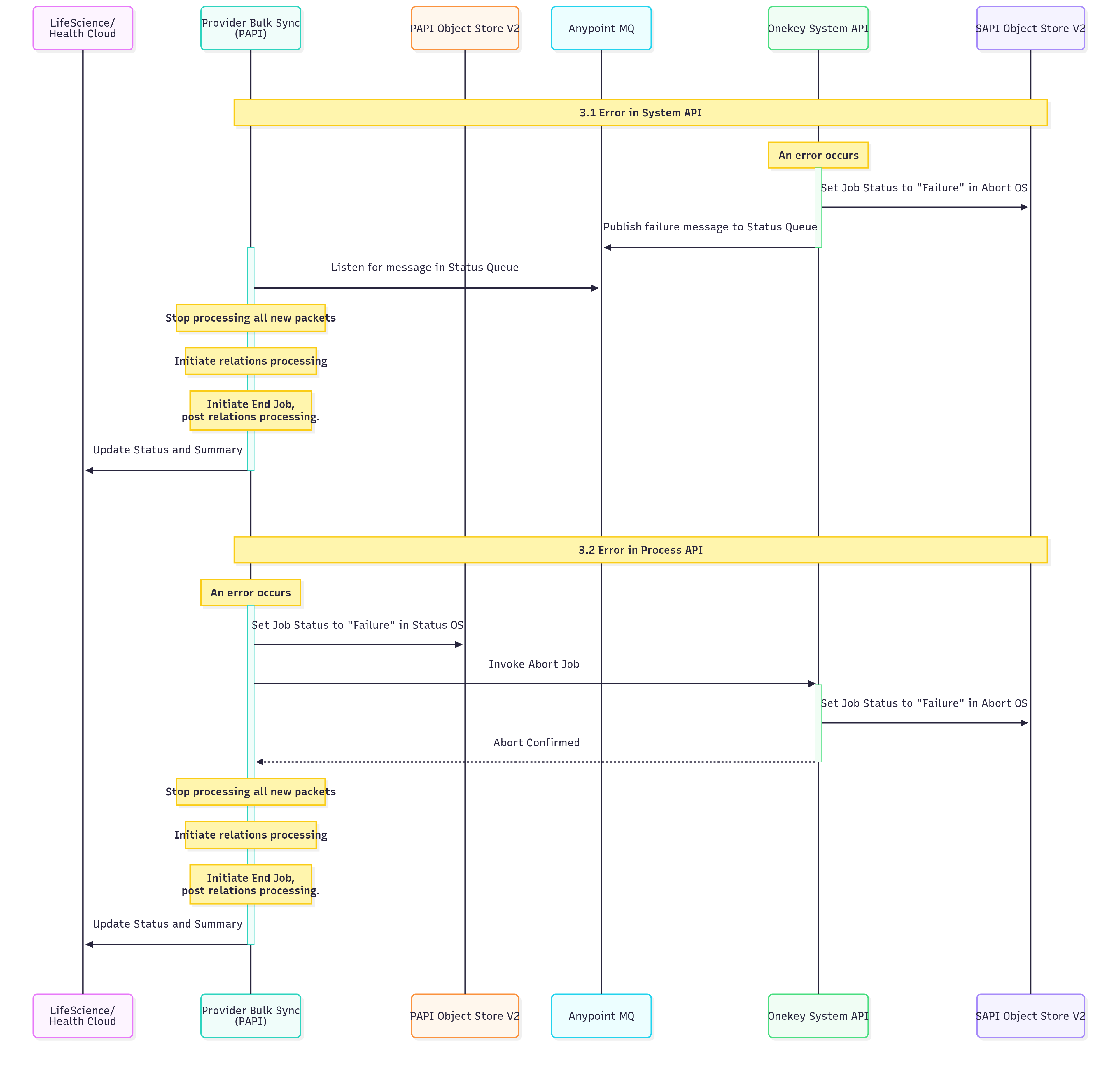
| S.No | Description |
|---|---|
| 3.1 | Error in System API: The job status is set to "Failure" in Abort OS, a failure message is published to the Status Queue, and the system listens for this message in the Status Queue. Subsequently, the processing of all new packets is halted, relations processing is initiated, and End Job post relations processing is commenced. Finally, the Status and Summary are updated. |
| 3.2 | Error in Process API: The job status is updated to "Failure" in Status OS, followed by the invocation of Abort Job. A job in the operating system (OS) fails. This triggers the job to be canceled, and its status is updated to Failed. After the job is canceled, all new packet processing stops. The system then processes any existing relations, marks the job as ended, and updates the job's final status and summary. |
4. Get Job Status:
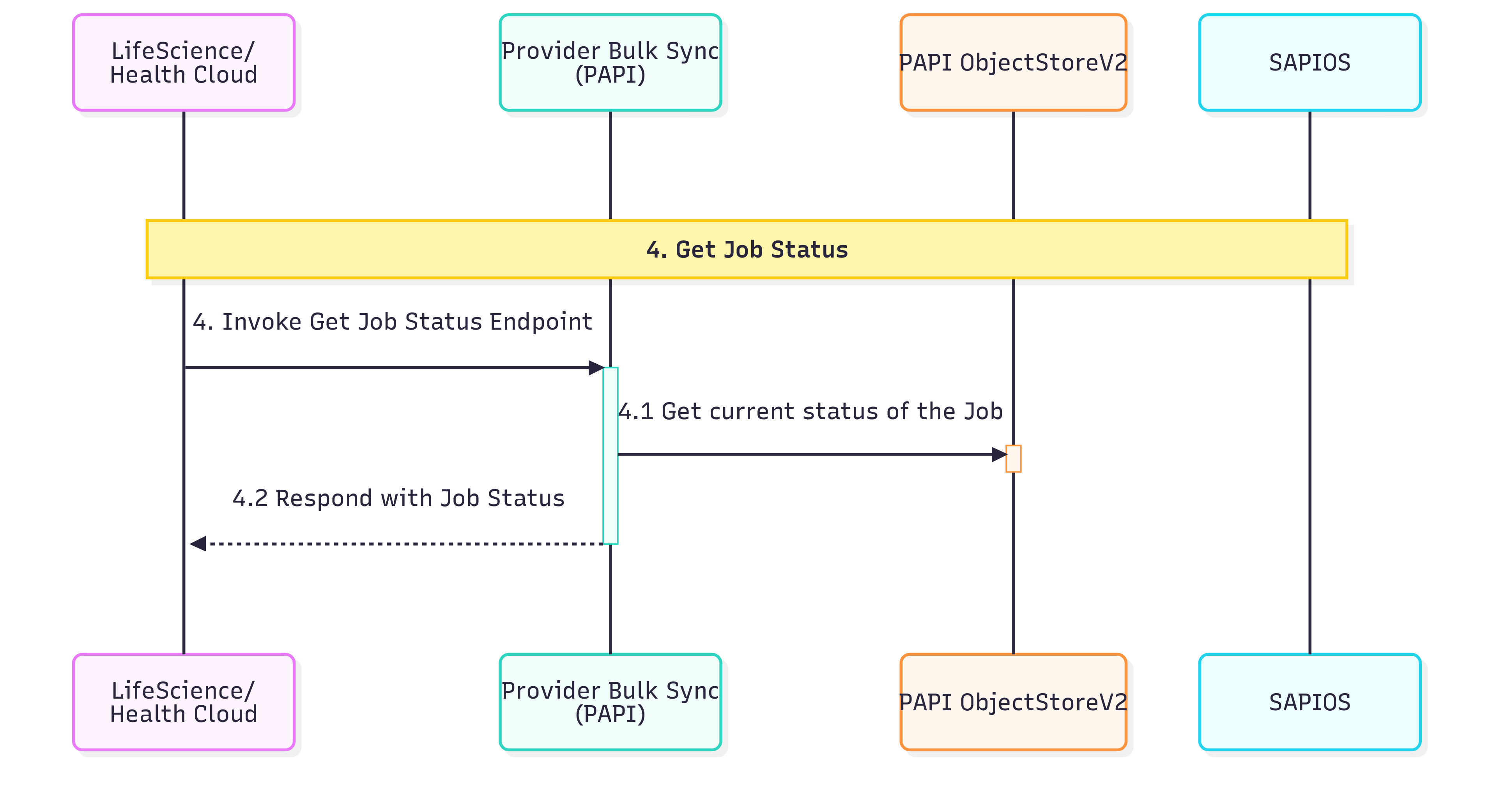
| S.No | Description |
|---|---|
| 4.1 | This step entails querying the Status OS to obtain the current execution status of the job. |
| 4.2 | This step returns the job status information for the requested job |
5. Abort Job:
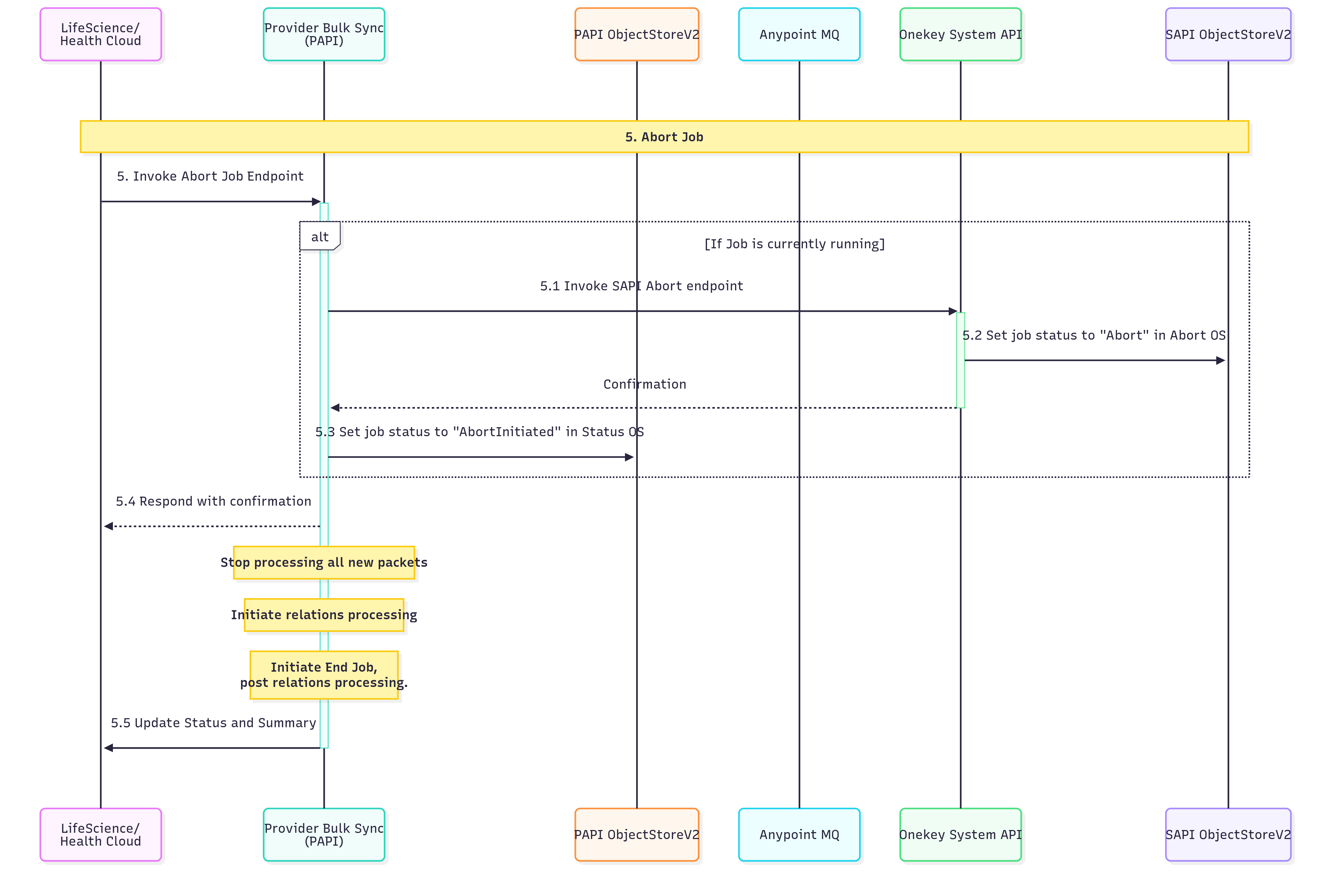
| S.No | Description |
|---|---|
| 5.1 | Check if a job is currently in a running state. If it’s running, invoke the Service API (SAPI) abort endpoint to initiate the termination process for the active job. |
| 5.2 | Update the job status to "Abort" in the Abort Operating System/Service to indicate that an abort request has been processed and the job is being terminated. |
| 5.3 | Set the job status to "AbortInitiated" in the Status Operating System/Service to track that the abort process has been officially started and is in progress. |
| 5.4 | Send a confirmation response to the requesting entity acknowledging the abort request. Simultaneously, stop processing all new incoming packets to prevent additional work from being queued. |
| 5.4.1 | Begin the process of handling any existing relationships or dependencies that need to be resolved before the job can be completely terminated. |
| 5.4.2 | Initiate the final job termination procedures after all relations processing has been completed to ensure a clean shutdown. |
| 5.5 | Update the final job status and generate a comprehensive summary of the abort process, including any relevant metrics or completion details. |